Admin guide
Close
User Administrator
  • Home
  • Server for Linux
    • Megaladata Server
      • Install as a service
      • Install in Podman/Docker
        • Debian 11.5 and Ubuntu 22.04
        • Fedora 43
        • OpenSUSE 15.4
    • Megaladata Integrator
      • Configuration
    • License Application
      • Software Key Activation
      • License Server
  • Server for Windows
    • Megaladata Server
      • Install
        • Microsoft IIS
      • Configuration
      • Update
      • Migration
      • Remove
    • Megaladata Integrator
      • Installation
      • Configure
      • Update
      • Migration
      • Remove
    • License Application
      • SP-key activation (online)
      • SP-key activation (offline)
      • Guardant key diagnostics
  • Studio Web Client
    • Configuration
  • Desktop Application for Windows
    • Install and Upgrade
    • Uninstallation
    • Licenses
  • Desktop Application for Linux
    • Installation
  • Batch Mode BatchLauncher
  • License Keys
    • Key implementation variants

Removing Megaladata Server

To remove the Megaladata Server, stop the Megaladata service and uninstall the application using one of these methods:

  • Remove the app from the Installed apps window in Windows.
  • Run the product installer and click Remove.
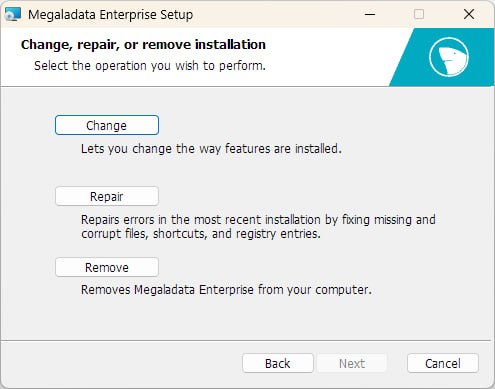
Megaladata installer window
  • Execute the following command in the command prompt as administrator:
msiexec /x Megaladata<Edition>_7.x.x.msi /qn

Read on: Megaladata Integrator for Windows

results matching ""

    No results matching ""