
Batch Mode: BatchLauncher
Batch mode enables the platform user to reuse a prepared workflow when it requires no additional actions.
In this mode, the user can start the necessary package using the BatchLauncher utility, which is included with the Megaladata server in the Team, Standard, and Enterprise editions.
By default, the path to the utility file is:
C:\Program Files\Megaladata\Server\BatchLauncher.exe
Batch mode can be operated both from the server and remotely. Any user can launch it, provided they have been given the necessary permissions.
Processing in batch mode can be started either manually or on a schedule using a third-party program (job scheduler), such as Task Scheduler in Windows or Cron in Linux.
Launching BatchLauncher
You can launch batch mode via the command line. The generalized command looks like this:
<Path to BatchLauncher utility>/Package=<Path to package file>
Example of launching the BatchLauncher from a server computer:
"C:\Program Files\Megaladata\Server\BatchLauncher.exe"/Package=/user/file.mgp
A detailed description of the commands is available in the User Guide (see BatchLauncher).
Launching batch mode without server access
Create a new user with batch execution permissions and access to the file storage (see the figure), or add these access settings to an existing user: log in as an administrator and go to Administration\Users, then mark the necessary checkboxes:
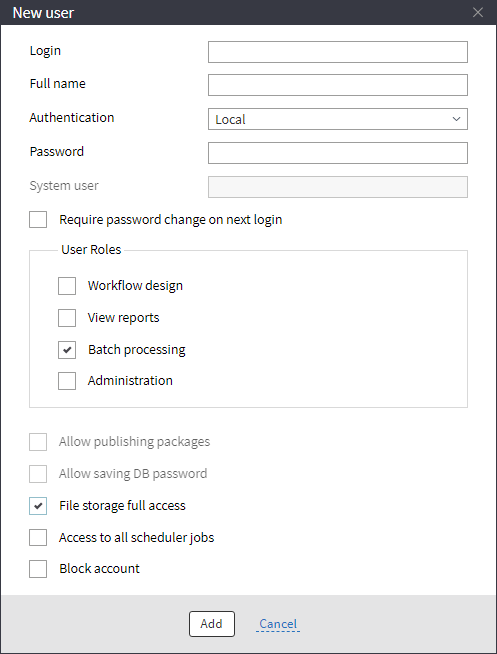
The login and password can be any.
You also need to copy the BatchLauncher.exe file from the server to the analyst's computer. Then, launch batch mode via the command line.
"C:\Program Files\Megaladata\BatchLauncher.exe" /Package="../user/Hughes/Calendar.mgp" /address="192.168.0.152" /Port="4580" /userName="batch" /Password=""
Launching the batch mode via a job scheduler is the same as for the server version.
Read on: License Keys