
Megaladata Integrator
Megaladata Integrator functions as an application for Internet Information Services (MS IIS) and enables the publication of custom web services.
Using Megaladata Integrator allows you to design an architecture that ensures fault tolerance, load balancing, and horizontal scaling.
System requirements
| Component | Minimum | Recommended |
|---|---|---|
| OS | Windows Server 2019 | |
| Software | IIS 8.0 and higher; ASP.NET Core runtime 8.0 hosting bundle | |
| CPU | 2 cores | 4 cores |
| RAM | 2 GB | 4 GB |
| HDD | 100 GB | 500 GB |
Interaction between platform elements
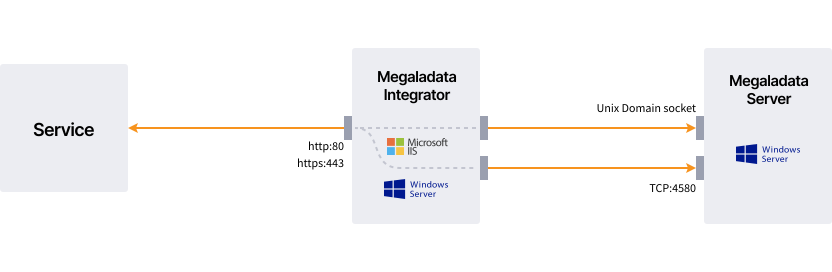
- An external service connects via the HTTP(S) protocol to the IIS web server where the Megaladata Integrator web application is deployed.
- The Integrator processes the request and establishes a connection via a TCP server port to the Megaladata server host.
Important: In the Integrator of the Megaladata Team edition, the system does not use TCP connections; it uses only a Unix socket.
Interaction specifics
- If the Megaladata Integrator configuration file specifies both
unixsocketandhostattributes, the system first attempts to connect via the Unix socket. If that attempt fails, it connects via TCP. - If the configuration file does not specify a
serverelement, the system first attempts to connect via the Unix socket and then via TCP.
The primary advantage of a Unix domain socket over TCP is improved performance when components reside on the same computer.
Security permission specifics
The user account running Megaladata Integrator must have the following permissions:
- Write access to the Unix socket file
- Read access to the folder containing this file
Articles in Section: