
Studio
Megaladata Studio is a client web application designed for creating data processing workflows, visualizing data, configuring the server, and managing user rights. Data processing is executed by the Megaladata Server.
Studio serves as the primary workspace for analysts and end users, providing the platform's user interface.
Supported browsers
- Chrome version 84.0 and higher
- Firefox version 79.0 and higher
- Opera version 70.0 and higher
- Safari version 14.1 and higher
- Edge version 84.0 and higher
- Other Chromium-based browsers version 84.0 and higher
Parameters for connecting to the Megaladata Server are defined in the configuration file.
Component interaction
Studio exchanges data with the Megaladata Server using the WebSocket protocol. A connection can be established in one of two ways: directly with the Megaladata Server, or through a WebSocket proxy configured on a web server.
A WebSocket proxy (wsproxy) allows access to the Megaladata Server through the web server's HTTP(S) port, which simplifies firewall configuration.
- To enable wsproxy on the built-in web server, select the Use WebSocket proxy option during installation.
- IIS requires a more complex configuration.
- By default, the WebSocket proxy is disabled.
Without wsproxy
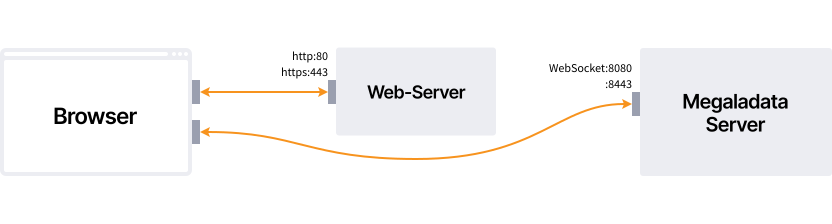
-
The browser connects to the web server via the HTTP protocol to load Megaladata Studio:
- Connection URL if HTTP encryption is disabled:
http://web-server-host:80/app - Connection URL if HTTP encryption is enabled:
https://web-server-host:443/app
- Connection URL if HTTP encryption is disabled:
-
A URL for connecting to the Megaladata Server is generated from the server.json configuration.
- Megaladata Studio establishes a connection to the Megaladata Server host via the WebSocket protocol:
Using wsproxy
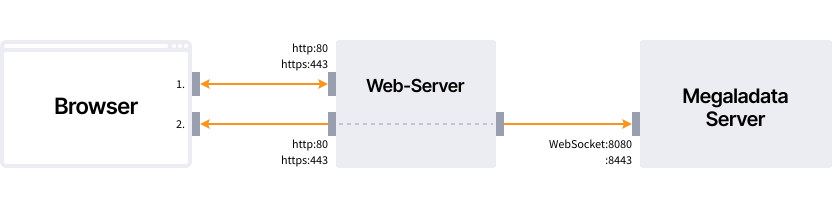
-
The browser connects to the web server via the HTTP protocol to load Megaladata Studio:
- Connection URL if HTTP encryption is disabled:
http://web-server-host:80/app - Connection URL if HTTP encryption is enabled:
https://web-server-host:443/app
- Connection URL if HTTP encryption is disabled:
-
A URL for connecting to the Megaladata Server is generated from the
server.jsonconfiguration. -
Megaladata Studio connects to the web server host via the WebSocket protocol:
- Connection URL if neither HTTP nor WebSocket encryption is enabled:
ws://web-server-host:80/ws - Connection URL if either HTTP or WebSocket encryption is enabled:
wss://web-server-host:443/ws
- Connection URL if neither HTTP nor WebSocket encryption is enabled:
-
The web server creates a connection to the Megaladata Server host via the WebSocket protocol and redirects the connection traffic from Megaladata Studio to it:
Articles in Section: